How to manage your membership

As a member of the Corgi Whizzwheels Club you manage your membership using your own settings – accessed using your membership portal.


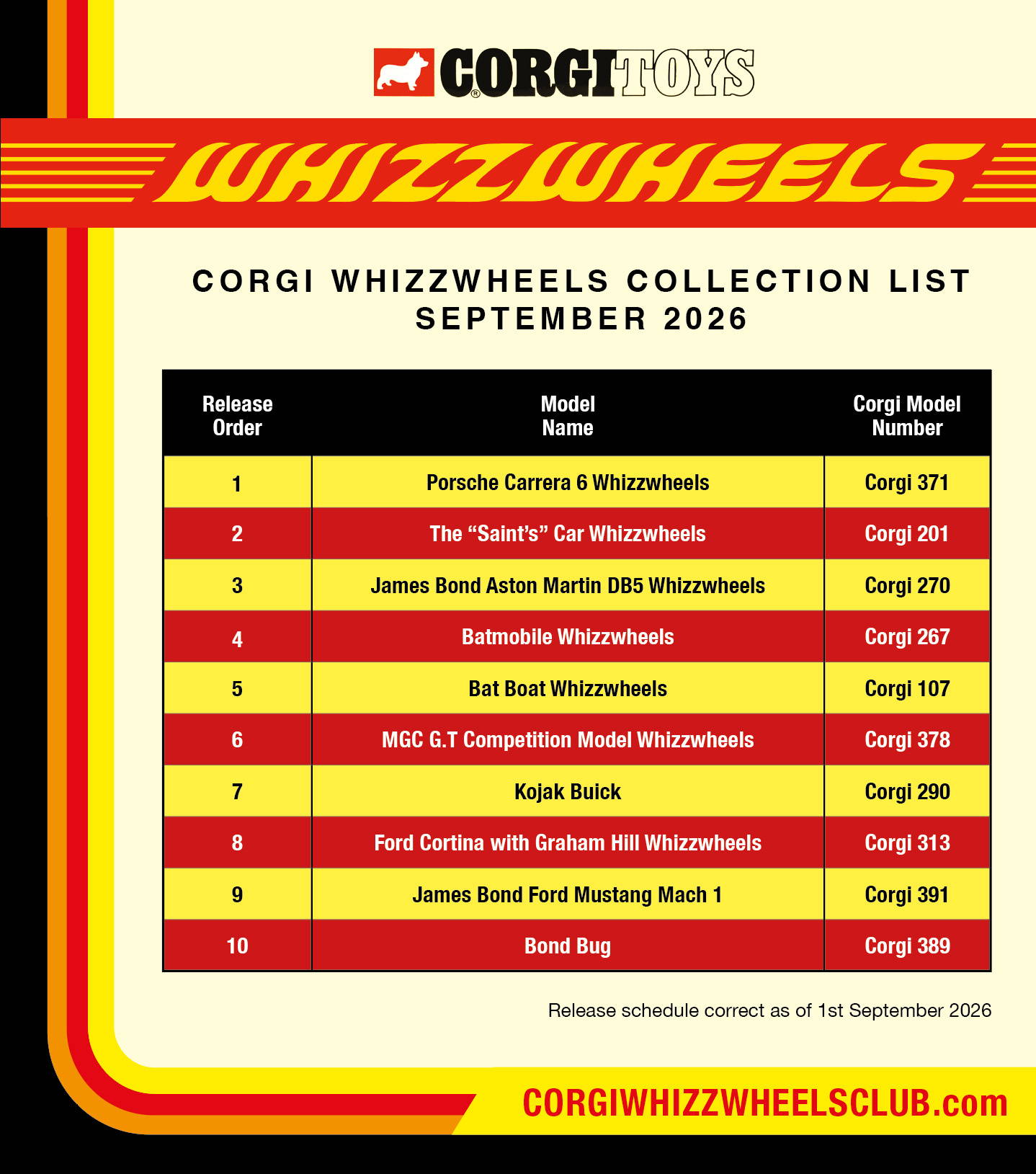
The default setting, if you choose to leave things as they are, is a monthly delivery of a Corgi Whizzwheels-era die-cast model. These are sent to you in the order shown by the Collection Plan below. In this instance, your monthly payment is taken automatically on the date you joined.  


Stay in control

Should you choose to self-manage your membership, use the following videos as an instructional guide. Even though the videos were originally created for a Corgi Model Club membership, the portal works the same for a Corgi Whizzwheels membership. if you have any queries please contact Customer Services.

1: Choose

HOW TO CHANGE YOUR NEXT MEMBERSHIP MODEL

If there’s a model in the Corgi Model Club collection you don’t fancy, simply CHANGE it for another model shown on the collection plan.

PLEASE BE AWARE that when you change a model, the order you receive the models will change, starting with the model you have just chosen. If you leave your membership running 'automatically' there is therefore a danger you may be sent models you may already have received. So make sure youPAUSE your membership after selecting the new model if you do not want this to happen! 

2: Order more

ADDING ADDITIONAL MODELS TO MY ORDER

We know that new members can find it frustrating when their collection can run behind when compared to our earliest members. In this instance you can add extra models to your order, which we call a CATCH UP service. This allows you to use your customer portal to add other models to your monthly delivery. The extra savings on delivery makes this an extremely cost effective way to collect our models!

3: Pause/Cancel

PAUSING OR CANCELLING MEMBERSHIP

When you log in to your customer portal you have the option to change your delivery schedule. This also lets you PAUSE membership to a date of your choice up to 6 months ahead. For a longer pause contact customer services by email support@corgimodelclub.com and they will set this for you. You can also use your customer portal to cancel your membership.

Questions and Answers...

How do I change my next model?

1. Click on View Your Next Order on the right hand sidebar in your Customer Portal. This will show you your next model.
2. Click on the yellow button next to the model that says Manage this Membership. 
3. On the next page, press the yellow button Swap this for a different model, and choose a model.

PLEASE NOTE that when you do this, you will be changing your model sequence. Therefore, if your default setting is to receive a monthly model, there is a danger you may receive a model you have already received. To avoid this, simply pause your membership. This will allow you time to wait until a new model is released or to manually choose another model at a later date.
Can I order more than one model at a time?
1. Click on View Your Next Order on the right hand sidebar in your Customer Portal. This will show you the model due to be sent to you next.
2. Scroll down to see the You may also like section.
3. From here you can choose to add any additional the models you'd like to receive as one-off products. Add as many or as few as you'd like. 
4. You can identify these products in your next order by the green One-time label. By contrast, ongoing 'one model per month' memberships are identified by a green Every month label.
Can I pause or cancel my membership?
1. Click on View Your Next Order on the right hand sidebar in your Customer Portal. I you are using the default setting of 'one model per month' this will show the next model you're due to receive.
2. Click on the yellow button next to the model that says Manage this Membership. 
3. On the next page, choose whether to Pause or Cancel your membership.